
Do you know how to use a ruler? Do you have a FFP scope with a mil reticle? Do you know how big the target is? Good, then you have everything you need to measure the distance to that target using your scope. Let’s go through the theory and have a look at some scope reticles and how to use them.
Introduction – The scope reticle
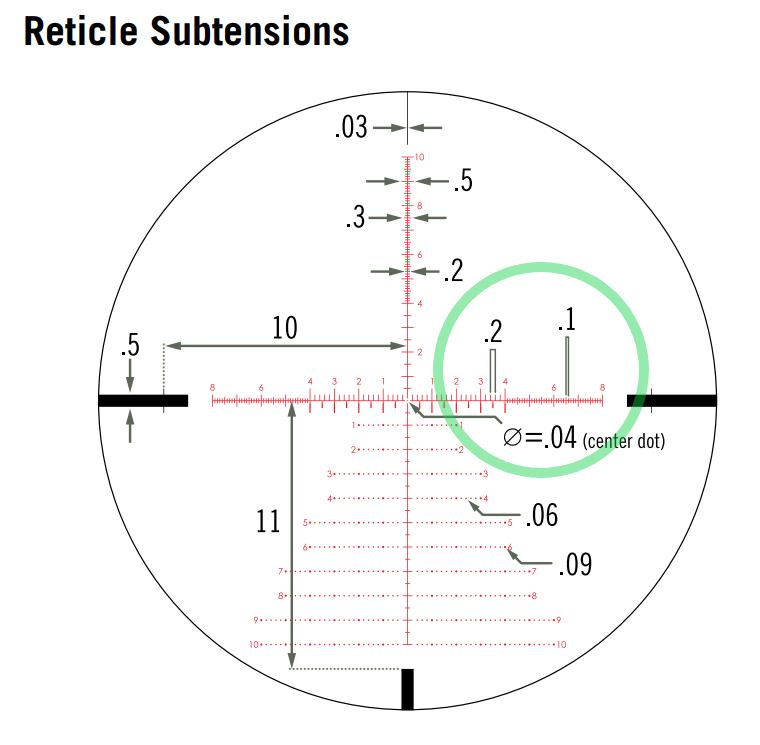
Most of you have used the reticle in your scope for hold over so you know the basics. Instead of turning the elevation turret 2.5 mils you simply use the equivalent line in your scope and hold over. We can use the same reticle lines to measure the size of an object in mils, just like you would use a ruler. Below is a picture of the Vortex EBR-7C mil reticle. In the green circle you see a measurement scale with first a 0.2 mil scale and then a 0.1 mil scale you can use to measure the width of a target. There is a similar scale on the vertical post for measuring the height of a target. Note that measuring only works properly on a first focal plane scope (if you want to measure with a second focal plane scop you have to use an exact magnification, any deviation from that will give you a measurement error)
How mils work
A mil is an angle measurement, you don’t need to know or understand its origin, just trust the process. A mil is 100mm (10cm) at 100m, 200mm (20cm) at 200m, 300mm (30cm) at 300m and so on. Simple as that.
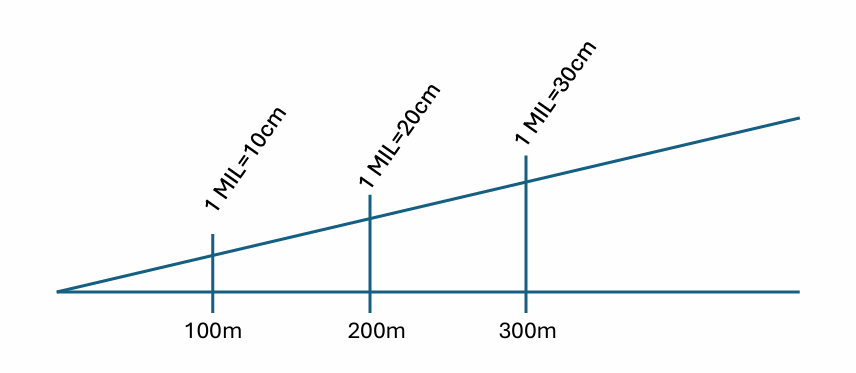
This means that if you know the size of the target you can measure how big it is in mils using your scope and calculate the distance using an extremely simple formula:
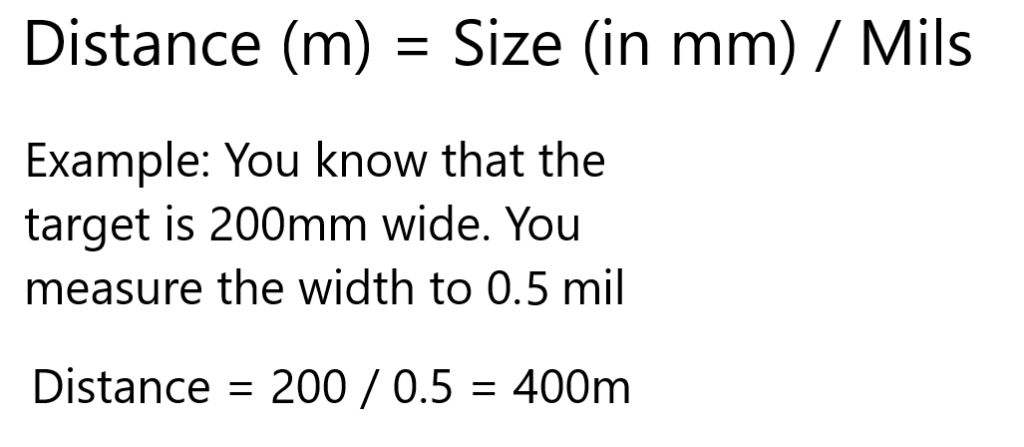
Pretty easy right? So how do you do this in practice? There are basically 3 main ways to do it:
1. Bring a pocket calculator with you (or use your phone if you want to live on the wild side)
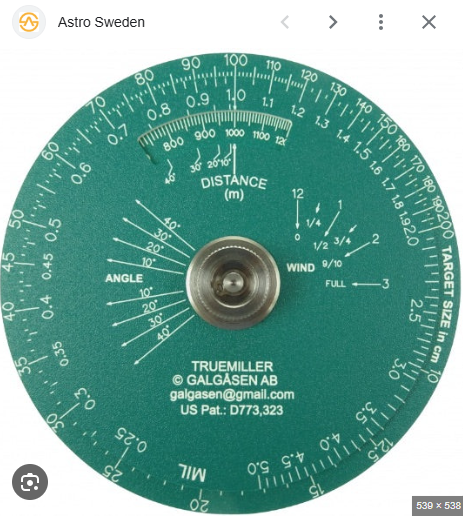
2. Use a dedicated tool like the Truemiller (available here: https://astrosweden.se/products/skyttehjalpmedel ). A truemiller has two round plastic plates, the outer one with the target sizes (in cm) and the inner one with the mil values. To calculate a distance you simply align the mil value with the size and get the distance in the little window. In the picture the size is 100cm (1000mm) and you have measured it to be 1.0 mil. That equals 1000m.
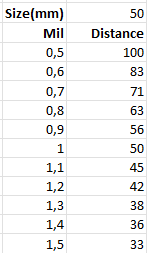
3. Make a table with different sizes and mil equivalent ranges. A simple exercize for the ones that like Excel.
On top of these classic alternatives you can use the Milling Calculator available in riflematch.com, read more about it here: https://kikarskytt.se/arkiv/582
Method pros and cons
There are of course up- and downsides to the different options. Using a calculator is exact and simple, same for the truemiller. With those two options you can manage any target size esily, but it takes some time and you have to let go of your rifle to do i. Using a table is faster but you’re a bit dependent on having the target sizes you need to measure in the table or you will have to extrapolate.
Final word about units of measurement
As in most applications using the metric system is really straightforward. If you want to complicate things a bit you can of course use freedom units as well, if you want to learn more about that have a look at this youtube clip: https://youtu.be/esyDqaGch5w?si=DqYouT03nQbtYl2T
Upptäck mer från
Prenumerera för att få de senaste inläggen skickade till din e-post.